Other signs: random numbers, symbols, or words in the URL. For example: https://login-bank.xyz/verify123, http://secure.bankkamu-2026.ru
Legitimate bank and institution websites almost always use standard domains like .co.id, .com, or .org.
3. Fear-Based and Urgent Messages
Phishing works by triggering emotion. Scammers want you to panic, rush, and not think logically.
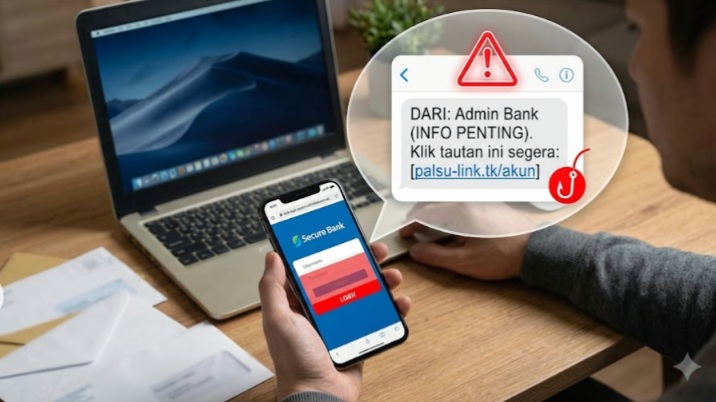
Real bank notifications usually appear inside the official m-banking app. Banks rarely send threats via personal SMS or WhatsApp.
If you get messages like: Account blocked! Click now! or You won a prize! Claim in 5 minutes!, be suspicious.
Safe step: don’t panic. Close the message and contact Customer Service using the number on your ATM card or official website.
4. Redirected to a Fake Login Page
This is the most dangerous trap. After you click the link, you’ll be taken to a page that looks 99% identical to the real site.
The goal is to make you enter your username, password, PIN, and OTP code. Once you submit it, your data goes straight to the scammer.
If you clicked by accident:
– Exit the page immediately
– Don’t enter any information
– Clear your browser history and cache ASAP
– Change your password through the official app
– Report it to your bank
5. No HTTPS Security Indicator
Official websites that handle sensitive data must have a security certificate. The sign is a green padlock icon next to the URL and the address starts with https://.
Read Also : : Next 20 Years in Banking: Key Shifts Ahead
If it only shows http:// without a padlock, or your browser warns “Not Secure”, leave the page immediately. It’s most likely a phishing site.